
In this article, we take a closer look at EVPN E-LINE/VPWS (Virtual Private Wire Service). This is a Layer 2 (L2) point-to-point service that many Internet service providers (ISPs) deploy today.
Traditionally, providers used LDP-signaled pseudowires for Layer 2 point-to-point services. However, many are now moving to EVPN-based solutions. The reason is clear: better scalability, easier deployment, and improved operations.
Why EVPN E-LINE/VPWS?
EVPN E-LINE/VPWS provides Layer 2 point-to-point connectivity. It runs over EVPN signaling in MPLS backbones, which makes the solution highly scalable.
In addition, customer endpoints are identified on Provider Edge (PE) routers with VPWS IDs.
These IDs are then discovered dynamically by other PEs through BGP EVPN signaling.
As a result, providers gain both flexibility and interoperability across multiple vendors.
Lab Setup and Topology
In our EVPN E-LINE/VPWS lab, we transport customer VLAN 512 across an MPLS backbone.
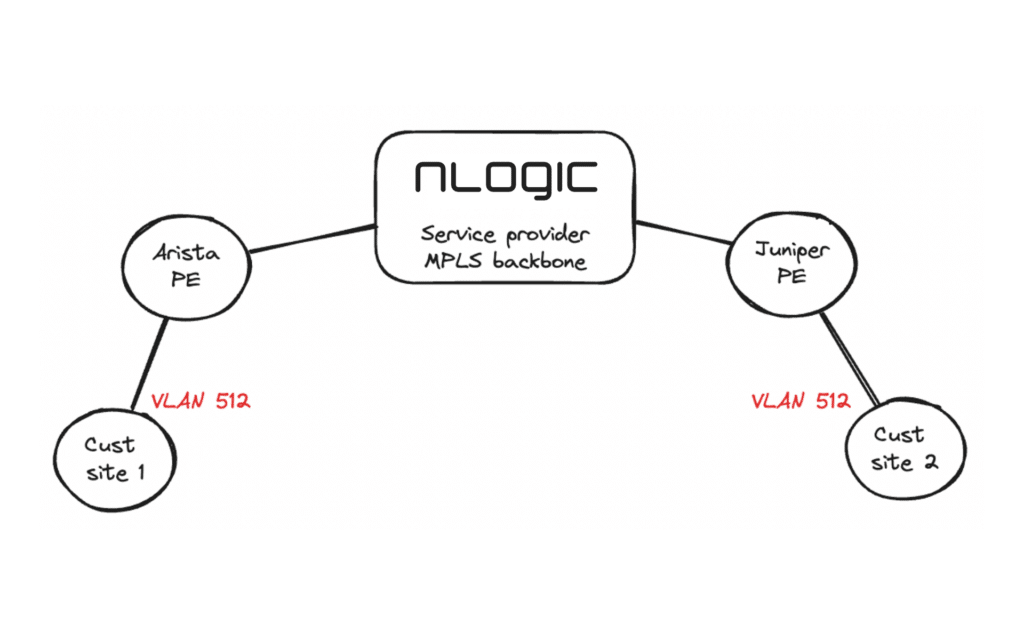
Devices used in this setup:
- One Arista PE router
- One Juniper PE router
This is a simple example that demonstrates the basic configuration. In production networks, however, additional options and redundancy would normally be applied.
We also assume that the core-facing interfaces and the BGP EVPN full mesh are already configured. In this case, we run ISIS with Segment Routing, but OSPF with LDP/RSVP could also be used.
// Customer interface
interface Ethernet2.512
   description "Customer site 1"
   encapsulation vlan
      client dot1q 512 network client
!
In Arista, we also need a “patch panel”. This is where we are bridging the local interface with the pseudowire.
// Patch panel
patch panel
   patch CustomerELINE
      connector LOCAL interface Ethernet2.512
      connector REMOTE pseudowire bgp vpws Customer1 pseudowire PW1
!
And then finally the BGP configuration:
router bgp 65550
   // Customer VPWS configuration
   vpws Customer1
      rd 10.10.10.1:800
      route-target import export evpn 65550:800
      mpls control-word
      !
      pseudowire PW1
         evpn vpws id local 100 remote 200
Important details:
- Both PEs must use the same route-target (65550:800).
- Moreover, VPWS IDs must match, but in reverse order (Local ID 100 / Remote ID 200).
// Customer interface
ge-0/0/1 {
    description "Customer site 2";
    flexible-vlan-tagging;
    encapsulation flexible-ethernet-services;
    unit 512 {
        encapsulation vlan-ccc;
        vlan-id 512;
    }
}
The only other thing we need is a routing instance:
routing-instances {
    Customer1 {
        instance-type evpn-vpws;
        protocols {
            evpn {
                interface ge-0/0/1.512 {
                    vpws-service-id {
                        local 200;
                        remote 100;
                    }
                }
                control-word;
            }
        }
        interface ge-0/0/1.512;
        route-distinguisher 10.10.10.3:800;
        vrf-target target:65550L:800;
    }
}
Notes:
- Local and remote VPWS IDs must match the Arista configuration.
- In addition, the route-distinguisher and route-target must also align.
R1#show patch panel CustomerELINE detail
PW Fault Legend:
   ET-IN - Ethernet receive fault
   ET-OUT - Ethernet transmit fault
   TUN-IN - Tunnel receive fault
   TUN-OUT - Tunnel transmit fault
   NF - Pseudowire not forwarding (other reason)

Patch: CustomerELINE, Status: Up, Last change: 22:53:48 ago
   Connector LOCAL: Ethernet2.512
      Status: Up
   Connector REMOTE: BGP VPWS Customer1 Pseudowire PW1
      Status: Up
      Local MPLS label: 100000
         MTU: 0, Control word: Y
      Neighbor 10.10.10.3, MPLS label: 19
         Tunnel type: IS-IS SR IPv4, Tunnel index: 1
         MTU: 0, Control word: Y
      EVPN VPWS type: VLAN-based
      Flow label used: no
As we can see, everything looks good. Both the local and remote side is up. We can see the remote Juniper PE IP 10.10.10.3 and that the remote PE has reserved label 19 and sent this to us.
We can also take a look at the EVPN prefixes:
R1#show bgp evpn
BGP routing table information for VRF default
Router identifier 10.10.10.1, local AS number 65550
Route status codes: * - valid, > - active, S - Stale, E - ECMP head, e - ECMP
                    c - Contributing to ECMP, % - Pending BGP convergence
Origin codes: i - IGP, e - EGP, ? - incomplete
AS Path Attributes: Or-ID - Originator ID, C-LST - Cluster List, LL Nexthop - Link Local Nexthop

          Network                Next Hop              Metric  LocPref Weight  Path
 * >      RD: 10.10.10.1:800 auto-discovery 100 0000:0000:0000:0000:0000
                                 -                     -       -       0       i
 * >      RD: 10.10.10.3:800 auto-discovery 200 0000:0000:0000:0000:0000
                                 10.10.10.3            -       100     0       i
Looking good! Let’s check the Juniper PE:
olofk@R3> show evpn vpws-instance Customer1
Instance: Customer1, Instance type: EVPN VPWS
  Route Distinguisher: 10.10.10.3:800
  Number of local interfaces: 1 (1 up)

    Interface name  ESI                            Mode          Role       Status     Control-Word    Flow-Label-Tx    Flow-Label-Rx
    ge-0/0/1.512    00:00:00:00:00:00:00:00:00:00single-homed    Primary    Up         Yes             No               No
        Local SID: 200 Advertised Label: 19
        Remote SID: 100
            PE addr         ESI                           Label  Mode           Role     TS                      Status
            10.10.10.1      00:00:00:00:00:00:00:00:00:00 100000 single-homed   Primary  2024-06-12 09:39:36.919 Resolved
  Number of protect interfaces: 0
Note the remote Arista PE IP 10.10.10.1 and the local and remote service IDs.
There is only one thing left to do – test the connection on the CEs. In our case, the CEs are a couple of Linux boxes. Let’s try with ping and traceroute:
// We have configured 2001:db8:5695::/64 on the CEs
user@ubuntu22-server:~$ ip address show dev ens4.512
4: ens4.512@ens4: <BROADCAST,MULTICAST,UP,LOWER_UP> mtu 1500 qdisc noqueue state UP group default qlen 1000
    link/ether 50:01:00:05:00:01 brd ff:ff:ff:ff:ff:ff
    inet6 2001:db8:5695::2/64 scope global
       valid_lft forever preferred_lft forever
    inet6 fe80::5201:ff:fe05:1/64 scope link
       valid_lft forever preferred_lft forever

// Ping
user@ubuntu22-server:~$ ping 2001:db8:5695::1 -c 5
PING 2001:db8:5695::1(2001:db8:5695::1) 56 data bytes
64 bytes from 2001:db8:5695::1: icmp_seq=1 ttl=64 time=27.0 ms
64 bytes from 2001:db8:5695::1: icmp_seq=2 ttl=64 time=28.3 ms
64 bytes from 2001:db8:5695::1: icmp_seq=3 ttl=64 time=29.4 ms
64 bytes from 2001:db8:5695::1: icmp_seq=4 ttl=64 time=28.3 ms
64 bytes from 2001:db8:5695::1: icmp_seq=5 ttl=64 time=28.2 ms

--- 2001:db8:5695::1 ping statistics ---
5 packets transmitted, 5 received, 0% packet loss, time 4002ms
rtt min/avg/max/mdev = 27.006/28.238/29.433/0.768 ms

// Traceroute
user@ubuntu22-server:~$ traceroute6 2001:db8:5695::1
traceroute to 2001:db8:5695::1 (2001:db8:5695::1) from 2001:db8:5695::2, port 33434, from port 56087, 30 hops max, 60 bytes packets
 1  2001:db8:5695::1 (2001:db8:5695::1)  26.526 ms  22.753 ms  27.437 ms
Conclusion
We have successfully configured and tested a fully functioning Layer 2 EVPN E-Line (VPWS) service across an MPLS backbone using Arista and Juniper PE routers.
Benefits of EVPN E-Line (VPWS):
- Scalable Layer 2 point-to-point connectivity
- Simplified configuration compared to LDP pseudowires
- Standards-based BGP EVPN signaling
- Multi-vendor interoperability
For production networks, additional configuration options such as QoS, redundancy (dual-homing), and OAM tools should be considered.
Har du spørsmål?
Ta kontakt med oss hvis du har spørsmål vedrørende EVPN E-LINE/VPWS med Juniper Networks og Arista Networks. Eller om du har andre spørsmål om våre partnere.
Ta kontakt med oss direkte eller send oss en melding nedenfor.